
Devenia multilingual WordPress guide
Multilingual WordPress you can inspect, repair, and trust
Choose a multilingual WordPress publishing architecture you can inspect, repair, and trust. Compare plugin-based language layers, separate sites, URLs, menus, hreflang, QA, and human review before you commit.
The real decision
Choose how the whole site will publish each language
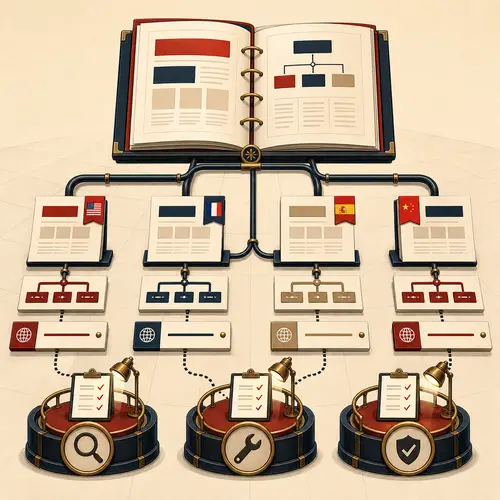
A multilingual WordPress site needs decisions about content, URLs, menus, metadata, search signals, QA, and editorial review. Translation is only one part of the publishing architecture.
Decide which work belongs to the plugin, which belongs to a controlled publishing process, and which still needs human judgment. Then decide how much operational risk the site can tolerate if the language layer fails.
Who owns what
Separate the plugin, the publishing process, and the human decisions
A dependable multilingual system makes each responsibility visible instead of asking one plugin to own the entire site.
Polylang provides the language foundation
Outside Devenia’s own system, Polylang remains our preferred multilingual plugin because separate posts and pages are easier to inspect, repair, and control.
A controlled publishing process handles repeated work
AI can help publish and maintain language versions when it works inside a governed process for URLs, menus, links, metadata, stale pages, QA, and review.
People make the decisions that affect trust
Market fit, tone, terminology, commercial judgment, proof, examples, and final editorial review still need humans.
A failure we had to recover from
WPML damaged the database and some content never came back
This happened on devenia.com. Database indexes disappeared, tables were damaged, and content was corrupted badly enough to require specialist database work.
A MySQL administrator spent days rebuilding what he could from the live database and backups. The backup carried damage from the same failure. Some content was recovered, and some was lost permanently.
What failed
Database indexes disappeared
The database lost indexes it needed to work normally.
Tables were damaged
The failure reached the WordPress data structure itself.
Content was corrupted
Normal WordPress repair was not enough to restore it.
The backup contained the same damage
Restoring the backup did not return the site to a clean state.
Some years of work were lost permanently
The language layer damaged the site it was supposed to help.
Before you choose
Compare the language systems before you commit
Choose the architecture after you have named the content, route, menu, metadata, search, review, and failure-recovery work it must carry.
Plugin options differ
Polylang is our preferred general-purpose option outside Devenia’s own systems. TranslatePress can suit visual translation work. qTranslate-XT can be lightweight, but long-term maintenance needs care.
Popularity does not remove operational risk
WPML is widely used, but a popular technical choice can still create a dangerous single point of failure.
Separate sites isolate failures
For large, important, or legally sensitive projects, separate WordPress installations can be safer than one shared language layer.
Separate language posts are easier to control
Each language can have its own title, URL, copy, examples, proof, and call to action.
The plugin does not finish the publishing work
Menus, internal links, metadata, hreflang, stale pages, localized copy, QA, and review still need active control.
SEO and trust
Keep the language signals and the reader experience consistent
Readers and search engines must be able to understand which page belongs to which language and where each link leads.
Language and URL signals
Use correct hreflang, localized search terms, and a stable URL structure. Translated pages should link to translated pages when those pages exist.
Trust and review signals
Use examples, objections, proof, and calls to action that fit the market. Final review must ask whether a real buyer in that language would trust the page.
When isolation matters
Separate sites can contain the damage
Separate WordPress installations require more maintenance, but one language failure cannot damage every market in the same database.
No multilingual plugin dependency
Each site can run without a shared language plugin.
Independent optimization for each market
Content, performance, integrations, and conversion paths can differ by market.
Lower shared failure risk
A failure in one installation does not automatically affect every language.
More maintenance
Each installation needs updates, monitoring, backups, and security work.
More coordination
Teams must coordinate hreflang, redirects, links, releases, and shared changes manually.
Safer does not mean simpler
Separate sites are useful when isolation is worth the extra operating work.
Use separate sites when commercial, legal, editorial, or operational isolation matters more than convenience.
Common questions
What multilingual WordPress still requires
Is multilingual WordPress just translation?
No. URLs, menus, internal links, hreflang, stale pages, QA, localized copy, and editorial review are also part of the publishing architecture.
Why does Devenia prefer Polylang outside its own systems?
Polylang keeps separate posts or pages for each language, which makes the content easier to inspect, repair, reason about, and control.
Can AI replace human multilingual review?
No. AI can help inside a controlled publishing process, but market fit, tone, terminology, commercial judgment, proof, examples, and final editorial review still need people.
The practical choice
Use the architecture you can repair when something goes wrong
WPML damaged this site badly enough to require specialist database recovery, and some content was lost permanently. Polylang gives a cleaner foundation, but the wider publishing process still has to control URLs, menus, links, metadata, hreflang, stale pages, QA, and editorial review.
Separate sites can reduce shared failure risk when isolation matters more than convenience. Whichever architecture you choose, use AI only inside a controlled process and keep the commercial and editorial decisions with people.