
Keep the detail. Lose the wait.
Your customers need to see the fabric, not download the camera file. We match image size, format and loading to the way each picture is used.

One photograph. Two different jobs.
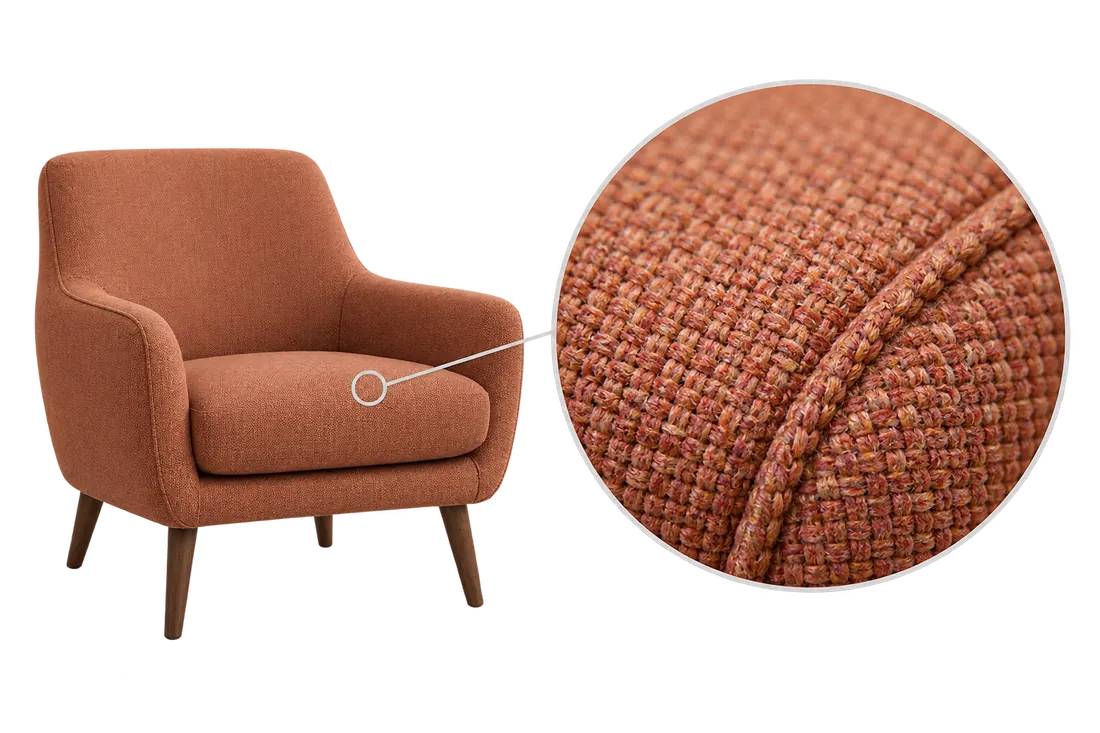
A small product-grid image helps a buyer recognise a chair’s shape and colour. A close-up must show the weave and stitching. Sending the same large file for both wastes data; shrinking both to a thumbnail loses useful detail.
Prepare suitable sizes for the grid and product page. Keep a larger source for an actual zoom view. Then inspect each at the size the customer sees: compression that works for the thumbnail can blur the fabric in a close-up.
Fix the file, the size and the timing.
Start with one slow page on a phone. Identify the first image the customer needs, then check these three things.
Choose the format by the result
Compare candidate formats at the same display size. Keep the smaller file only when edges, texture and colour still look right in the browsers your customers use.
Give the browser suitable sizes
A picture displayed 400 CSS pixels wide may need an 800-pixel source on a 2× screen. Supply image candidates and an accurate display size so the browser can choose. How responsive image selection works.
Load the important image first
Let the main visible image load promptly. Defer images farther down the page, and reserve their space so prices and buttons do not jump when they arrive. Image-loading guidance.
A smaller file is only half the check.
Compare the same page, viewport and test conditions before and after the change. Check what reaches the customer, not just the file in the media library.
What was downloaded?
Record the actual image file and bytes downloaded. An optimised file changes nothing if the page still serves the old original.
What detail remains?
Compare the same crop at the same display size. For the chair, inspect fabric texture, stitching and colour in the grid, full view and zoom separately.
What happens while loading?
Check when the main image appears and whether the price or purchase button moves. Repeat under matching conditions before judging the improvement.
Only need to send a large file? Use Devenia Send.
Give customers the detail without the delay.
Send one slow page, the device where it feels slow and the image detail your customers need. Tell us whether the problem affects the first image, the gallery or the zoom view.