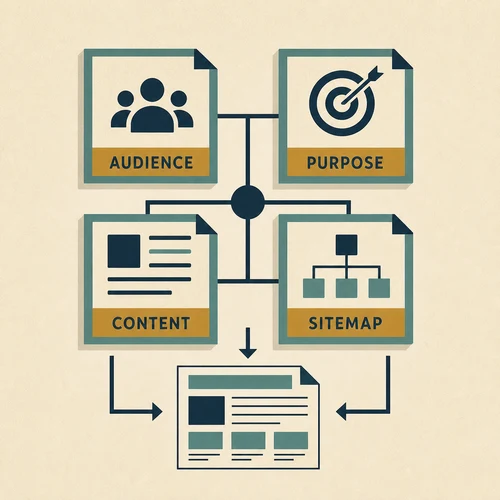
Building a website without a plan is like constructing a house without blueprints. Sure, you could do it. But you probably shouldn’t. 🏗️
What Is Web Planning?
Web planning is the thinking-before-doing phase. It’s where you figure out who your site is for, what it needs to accomplish, and how it should be organized – before you start building anything.
Think of it like this: changing your mind about wall placement is easy when you’re looking at a sketch. It’s expensive and frustrating when the walls are already up.
Good web planning prevents the classic mistakes we’ve seen hundreds of times since 2007: clients who skip planning end up spending twice as much fixing problems that proper web planning would have prevented.
Why Web Planning Matters 📋
“Let’s just start and figure it out as we go” – famous last words of many failed web projects. Here’s why planning upfront beats winging it:
💰 Saves Money
Rebuilding a poorly planned site costs way more than planning it right the first time. We’ve seen companies spend 3x their original budget fixing structural mistakes. Moving a page in a sitemap takes seconds. Restructuring a live website with hundreds of pages? That’s weeks of work.
⏱️ Saves Time
“Let’s just start and figure it out” sounds efficient. It’s not. Every decision you postpone becomes a decision you’ll make under pressure later – usually when you’re already behind schedule and over budget.
📈 Better Results
Planned websites convert better because they’re designed around user needs, not afterthoughts. Every page has a purpose. Every click leads somewhere intentional. Random doesn’t sell.
🔍 Easier SEO
Site structure affects search rankings more than most people realize. URLs, navigation hierarchy, internal linking – all of this needs to be right from the start. Retrofitting SEO-friendly structure into a messy site is painful.
The 5 Pillars of Web Planning 🎯
A solid web plan covers these essentials. Skip any of them, and you’ll be retrofitting later.
1. Audience
Who is this for?
“Everyone” is not an audience. “Small business owners in the UK looking for accounting software” is an audience.
- Who are your ideal visitors?
- What problems are they solving?
- How tech-savvy are they?
- What devices do they use?
2. Purpose
What should this achieve?
Every website needs a job. Most have multiple purposes, but one should be primary.
- Generate leads
- Sell products
- Provide information
- Build credibility
3. Content
What goes on each page?
Content isn’t “we’ll write something later.” It’s the substance of your site.
- List every page needed
- Outline what each covers
- Identify media needed
- Assign who writes what
4. Structure
How is it organized?
A good structure feels invisible – visitors find what they need without thinking.
- Information architecture
- Navigation design
- URL structure (SEO!)
- Internal linking
5. Functionality
What does it need to do?
Each feature adds complexity and cost. Better to know upfront.
- Contact forms
- E-commerce / cart
- Member login
- Booking systems
Common Web Planning Mistakes 🚫
After 18+ years of web projects, we’ve seen every mistake. Here are the classics:
Designing before planning
“I want it to look like Apple’s website” – Great. But Apple’s structure won’t work for your accounting firm. Form follows function, not the other way around.
Too many stakeholders
When everyone has input, nobody makes decisions. Assign one person to make final calls, or watch your project drag on forever.
Ignoring mobile
More than half of web traffic is mobile. If your planning doesn’t consider how things work on a phone, you’re planning for yesterday.
Forgetting maintenance
Who updates the site after launch? How often? With what content? A website isn’t a one-time project – it’s an ongoing commitment.
What Good Web Planning Looks Like ✅
Here’s a realistic planning workflow:
- Discovery – Understand the business, audience, and goals
- Content audit – What exists? What’s missing? What’s outdated?
- Sitemap – Map out every page and how they connect
- Wireframes – Sketch page layouts without design details
- Content plan – Who creates what, and when
- Technical requirements – Features, integrations, hosting
- Review and approval – Get sign-off before building
This process takes time. For a small business site, maybe a week or two. For a large corporate site, could be months. But it’s always faster than fixing a mess later.
The Bottom Line
Web planning isn’t glamorous. Nobody gets excited about sitemaps and content inventories. But it’s the difference between a website that works and one that… kind of works, sort of, if you squint.
Every hour spent on web planning saves multiple hours in development. Every decision made early is a crisis avoided later.
Plan first. Build second. Your future self (and your budget) will thank you.
Need Help With Web Planning? 🚀
We’ve been building websites since before most people had internet access. We know what works, what doesn’t, and how to avoid the pitfalls.
Learn more about site content, understand your site audience, or check out our web design services. 🚀
Related terms 🔗
Web site planning FAQ 🙋
What is web site planning?
Web site planning is defining purpose, audience, structure, content, and next steps before you start building pages.
What should I plan first?
Start with your u003ca href=’https://devenia.com/learn/dictionary/web-site-purpose/’u003epurposeu003c/au003e and your audience. Everything else follows from that.
How many pages should I plan?
Plan the essential pages first (home, services, proof, about, contact), then add supporting content based on real questions.
Does planning affect SEO?
Yes. A clear structure and content plan makes it easier to build topical depth for u003ca href=’https://devenia.com/learn/dictionary/seo/’u003eSEOu003c/au003e.
What’s the biggest planning mistake?
Starting with design and skipping content. A beautiful empty site is still empty.